How to Add a Rick Roll QR Code to a T-Shirt Using Your Own Design
March 9, 2026

One of the most legendary internet pranks of all time is the Rick Roll, where someone clicks a link expecting something normal and is instead greeted by Rick Astley performing "Never Gonna Give You Up." Now imagine that prank living on a t-shirt. Someone scans the QR code on the back of your shirt, and boom, they have been Rick Rolled in person.
With Smizzy, you can design a completely custom t-shirt with AI-generated artwork on the front and a scannable QR code on the back that links directly to the Rick Roll video. The best part? There is actually a dedicated button for it. Here is exactly how to do it, step by step.
Step 1: Open the Smizzy Design Generator
Head over to smizzy.store and you will land on the main design generator page. This is where you will enter all of your design parameters. If you are not signed in yet, click the Sign In button at the top of the page. You can sign up instantly with your Google account. Signing in gives you free monthly generation credits and lets you save your designs.
Step 2: Describe Your Front Design
The first field you will see is the main design prompt, labeled "FRONT OF SHIRT." This is where you describe the artwork you want the AI to generate for the front of your t-shirt. Be as creative and descriptive as you want. The more detail you give, the better the result.
Example Prompts for a Rick Roll Shirt
- • "A cartoon microphone surrounded by musical notes and disco balls, retro 80s colors."
- • "A cool cat wearing sunglasses and headphones, grooving to music with neon lights."
- • "A pixelated video play button icon on a vintage TV screen, vaporwave aesthetic."
- • "A suspicious treasure chest with a glowing question mark floating above it."
The beauty of a Rick Roll shirt is that the front design does not have to give away the prank. You can make it something totally unrelated and mysterious, or you can lean into the music theme. It is entirely up to you.

A retro 80s-inspired front design that keeps the prank a mystery.
Step 3: Pick an Art Style
Right below the prompt field, you will see the Style picker. This is a visual grid of 12 curated art styles that completely change the look and feel of the AI-generated artwork. For a Rick Roll shirt, some fun picks include:
- 80s Retrowave / Outrun for that classic synthwave nostalgia that matches the era of the original song.
- Vintage Pop-Art for a bold, comic-book style that screams fun.
- 90s Skate / Grunge for an underground, rebellious look that keeps people guessing.
Pick the one that vibes with your idea, or just leave it on "Default / Wing It" and let the AI surprise you.
Step 4: Choose Your Shirt Color
Next, select either Black or White for the shirt color. The AI will automatically optimize the artwork to look best on the color you choose. Black shirts tend to make vibrant neon designs pop, while white shirts give a cleaner, more classic look. For a Rick Roll shirt, black is usually the way to go for that element of mystery.
Step 5: Add Your Text
There are two text fields to fill in. These are both required:
Text Below Art (Front of Shirt)
This text appears directly below the AI artwork on the front. You could write something playful like "TRUST ME" or "SCAN THE BACK" or even something completely unrelated to throw people off.
Text Above QR (Back of Shirt)
This text is printed just above the QR code on the back of the shirt. This is where you really sell the prank. Great options include "SCAN ME", "FREE MUSIC", "EXCLUSIVE DROP", or "HEAR MY NEW SONG". The more convincing the bait, the better the reaction.
Step 6: Click the "Add Rick Roll" Button
Now for the fun part. Look at the QR Link field. When this field is empty or only has the default "https://" prefix, you will see a small button appear just below it:
The Magic Button
🎵 Add Rick Roll
Click it once, and the QR Link field instantly fills in with the official YouTube link to Rick Astley's "Never Gonna Give You Up" music video. That is it. No copying and pasting URLs. No hunting for the right link. One click and you are done.
The button only appears when the QR Link field is empty, so if you have already typed something in there, just clear the field and it will reappear.

The moment of truth: scan the code and get Rick Rolled.
Step 7: Pick a Font (Optional)
The Text Font dropdown lets you choose from over 25 fonts for how your text looks on both the front and back of the shirt. Scroll through the options and pick one that fits the mood of your design. Each font option displays in its own typeface so you can preview exactly how it looks before committing. If you are unsure, the default Fredoka One is a great all-around choice that is bold and readable.
Step 8: Generate Your Design
Once all of your fields are filled in, the GENERATE CONCEPT button at the bottom will light up with a glowing cyan gradient. Click it and wait about 30 seconds. The AI will generate your custom artwork, and Smizzy will automatically create the QR code from the Rick Roll link you added.
When the generation is complete, three preview windows will appear: the Raw Art (just the AI artwork), the Front View (artwork on the shirt mockup with your text and optional logo), and the Back View (the QR code on the shirt mockup with your back text). You can tap or hover over any of these previews to zoom in and inspect the details.
Step 9: Save or Buy Your Shirt
If you like what you see, you have two options:
Save Draft
Saves the design to your personal gallery so you can come back to it later. You can store up to 24 saved designs. Drafts are kept for 30 days.
Select Size & Add to Cart
Opens a quick size selector where you pick S through 2XL and your quantity, then adds it straight to your cart. From there you can check out securely via Stripe with Apple Pay, Google Pay, or any major credit card.
If the design is not quite right, you can also use the Edit This Design panel that appears below the generate button. Type a quick instruction like "make it more colorful" or "add more stars in the background" and click Apply. The AI will refine your existing artwork without starting over.
Why This Is the Perfect Prank Shirt
What makes this so effective is that the QR code on the back is completely real and functional. Anyone with a smartphone can scan it, and they get sent directly to the video. The front of the shirt can be anything you want, so nobody suspects a thing until they scan and hear that iconic opening line.
It is a great conversation starter at parties, concerts, conventions, and anywhere with crowds. And because Smizzy prints on industry-standard Gildan 5000 heavy cotton tees with direct-to-garment printing, the QR code comes out crisp, scannable, and durable enough to survive regular washing.

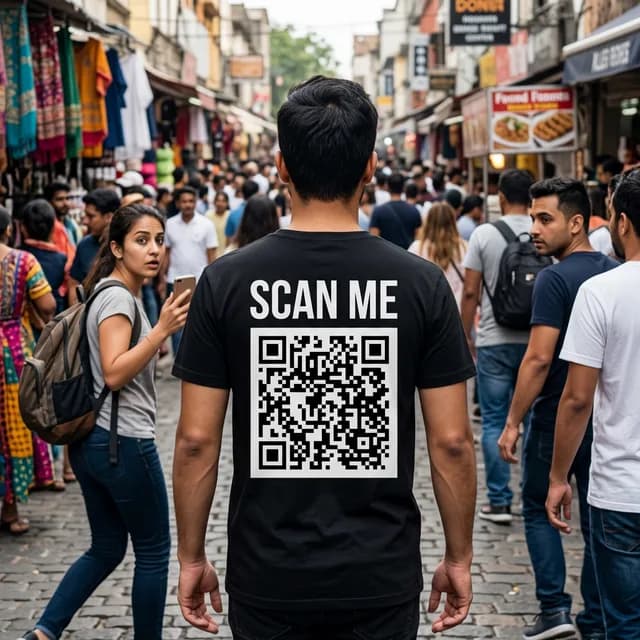
The Rick Roll prank in action. Everyone gets a laugh.

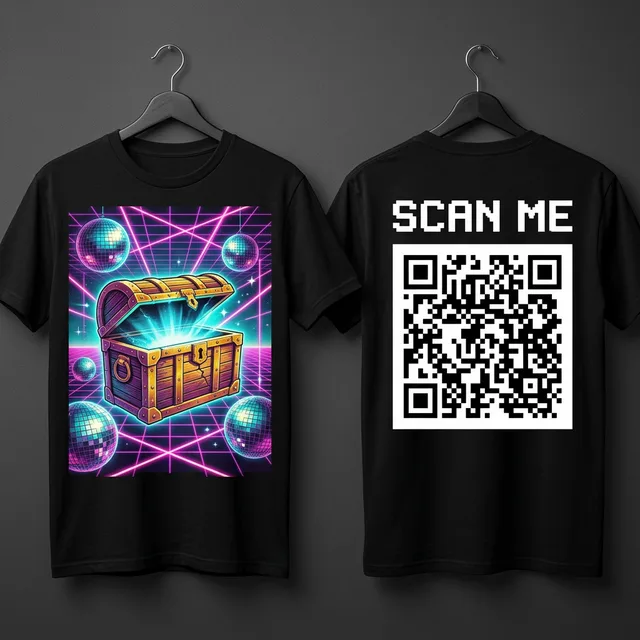
The full package: mysterious art on the front, Rick Roll QR on the back.
Quick Recap
- Sign in to Smizzy.
- Describe your front design in the prompt field.
- Pick an art style from the visual grid.
- Choose black or white for your shirt color.
- Type your front text (below art) and back text (above QR).
- Click the 🎵 Add Rick Roll button to auto-fill the QR link.
- Pick your font.
- Hit Generate Concept and wait about 30 seconds.
- Review your previews, then save or add to cart.
Ready to Rick Roll the world? Start designing now →